
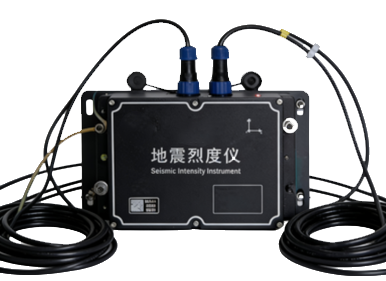
Seismic Intensity Instrument
Seismic intensity instrument for earthquake intensity quick reporting and earthquake alarm applications, integrating three orthogonal MEMS acceleration sensors and 24-bit acquisition with EW, NS, and UD components, TCP/IP network transmission, NTP and GNSS timing, event triggering, and PGA, PGV, and PGD parameter output.
System Category
DL-SE
Signal Type
Seismic intensity
Communication
TCP/IP Ethernet, serial, NTP, and GNSS timing
Application Fit
Typical applications for this product
Industrial Equipment Monitoring
Monitor rotating machinery and industrial equipment condition including vibration, torque, shaft power, rotational speed, shaft torsional vibration, and operational condition trends.
Typical configuration reference
Cultural Heritage Monitoring System
Monitor crack evolution, structural vibration response, tilt, displacement, long-term deformation, rock-mass fissure evolution, weathering-related structural degradation, stability trends, and environmental or human-activity impact for protected heritage assets.
Typical configuration reference
Civil Infrastructure Structural Monitoring
Monitor civil infrastructure deformation, strain, vibration, displacement, tilt, cracks, settlement, GNSS movement, cable force, seismic response, and construction-stage structural behavior.
Typical configuration reference
Research & Engineering Testing
Capture modal response, vibration response, dynamic strain, torque, speed, temperature, pressure, force, displacement, and synchronized multi-channel data for engineering verification.
Typical configuration reference
Product Image and Application Context
Visual reference for Seismic Intensity Instrument
Product images are used when available for RFQ evaluation and product recognition.
Primary Product Image
Product image configured for this product.
Building
Typical floor or wall mounted deployment for project configuration.
Dam
Typical floor or wall mounted deployment for project configuration.
Tunnel
Typical floor or wall mounted deployment for project configuration.
Technical Specifications
Category
DL-SE
Measurement Range
Horizontal +/-19.6 m/s2; vertical -29.4 to +9.8 m/s2
Sampling Rate
50, 100, or 200 sps
Communication Protocol
TCP/IP Ethernet, serial, NTP, and GNSS timing
Protection Level
IP67
Power Supply
9-18 VDC
Application Tags
Building, Dam, Tunnel, Bridge, Seismic
Installation Type
Floor or wall mounted
Engineering Applications
Where this DL product is applied
Designed for seismic intensity rapid reporting and earthquake alarm workflows.
Three-component MEMS acceleration and 24-bit acquisition support EW, NS, and UD observation channels.
Supports event triggering, intensity calculation, PGA, PGV, and PGD output.
Technical basis may reference DB/T59-2015, GB/T 17626, and GB/T 6587.
Typical Use Cases
Typical monitoring use cases
Building, dam, bridge, and tunnel seismic intensity monitoring.
Earthquake alarm and rapid reporting stations requiring networked event transmission.
System Integration Context
Sensor, DAQ, and software context
Configure orientation, installation mode, timing, network, and event-trigger parameters during commissioning.
Use floor or wall mounting according to the station design and correct azimuth settings.
Remove original device names, default account examples, internal IP examples, and software branding from public documentation.